New · 1.2 Google Drive sync · No ads · No watermarks
Your documents, locked on your phone.
Scan your Aadhaar, PAN, licence, marksheets and receipts. Docly sorts them, reads the text and keeps
everything offline behind your fingerprint. Want them on every phone? Back up to your own Google Drive.
Free, with nothing to pay for later.
Six things Docly does for every document you add, all of it on your phone.
01 — Capture
Scan it, or bring it in.
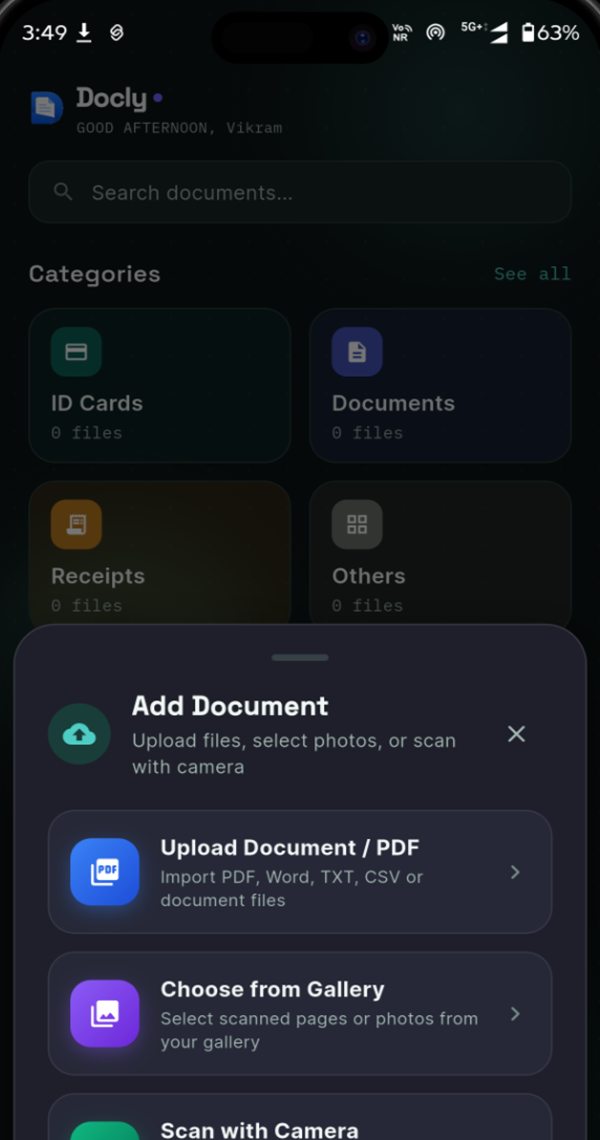
Point the camera at a page and Docly finds the edges, crops and straightens it. Already have the file? Import PDFs, Word, TXT or CSV files and photos from your gallery.
Auto edge detection
Multi-page
PDF · Word · images
02 — Sort
It files and names itself.
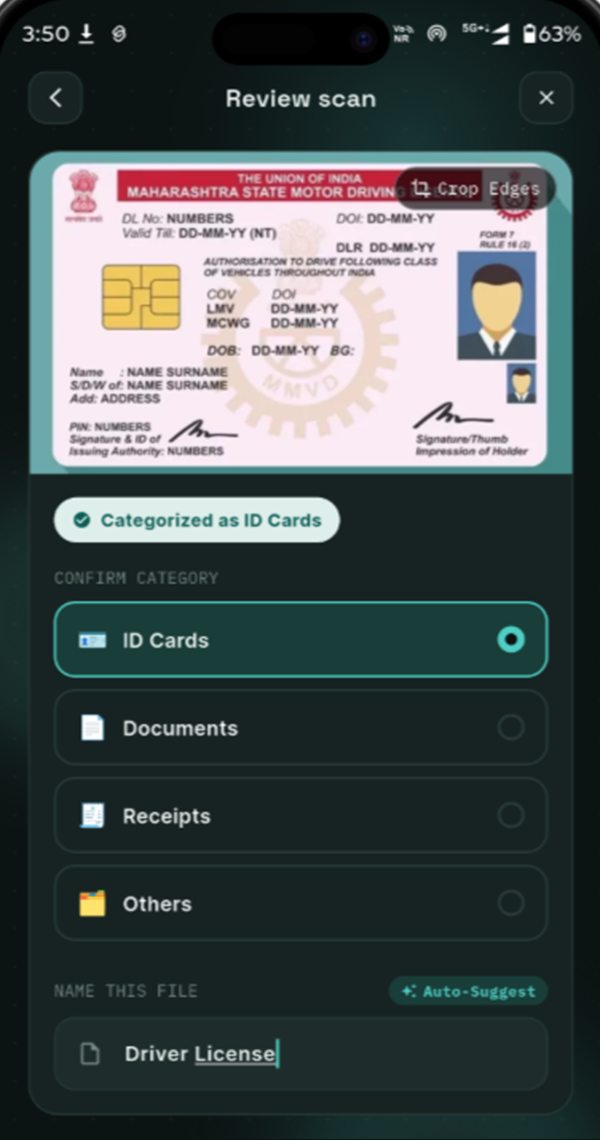
Docly recognises what you scanned, puts it under ID Cards, Documents, Receipts or Others, and suggests a name like “Driver License”. You just confirm.
Auto category
Name suggestions
Crop edges
03 — Organise
Everything in its place.
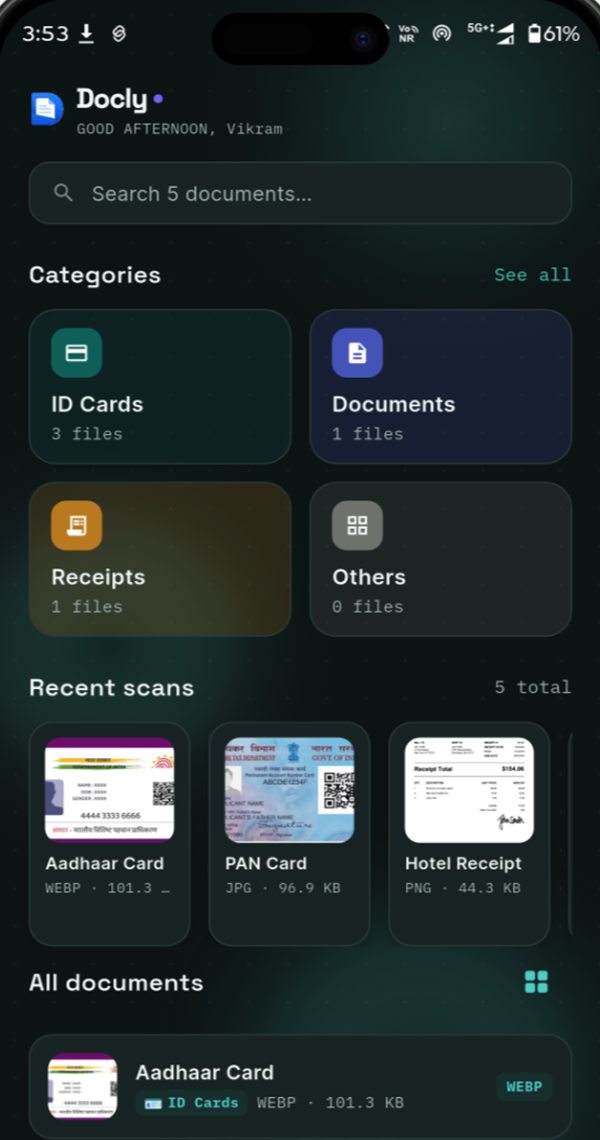
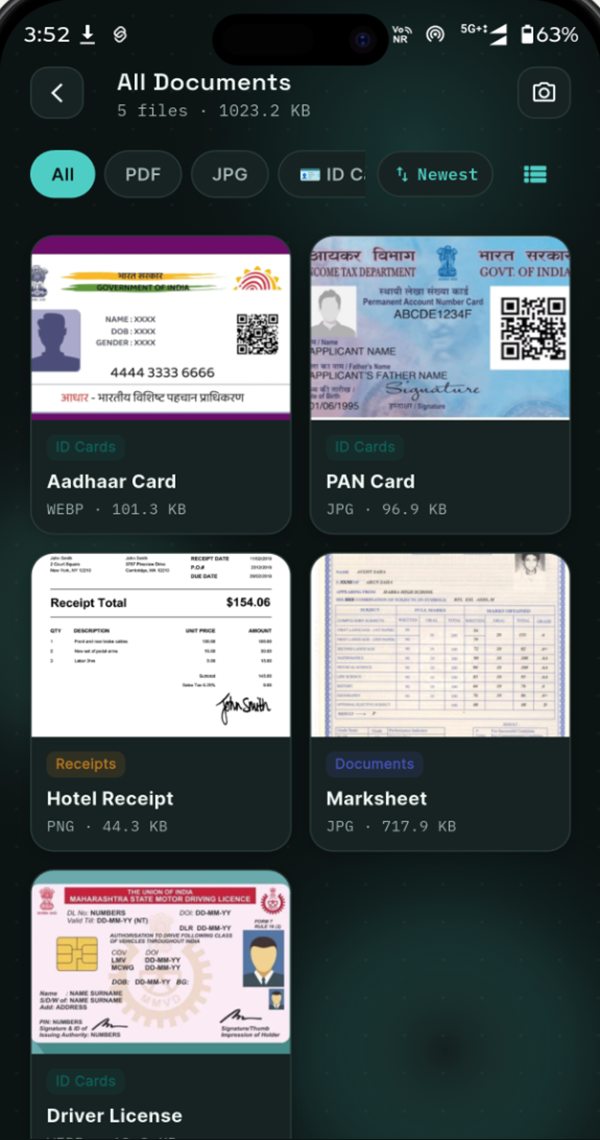
Home shows your Document Journey, each category and your latest scans. Pin the papers you reach for most, star your favourites, and the right one is always two taps away.
Categories
Recent scans
Pin & favourites
04 — Read
Copy text straight off the card.
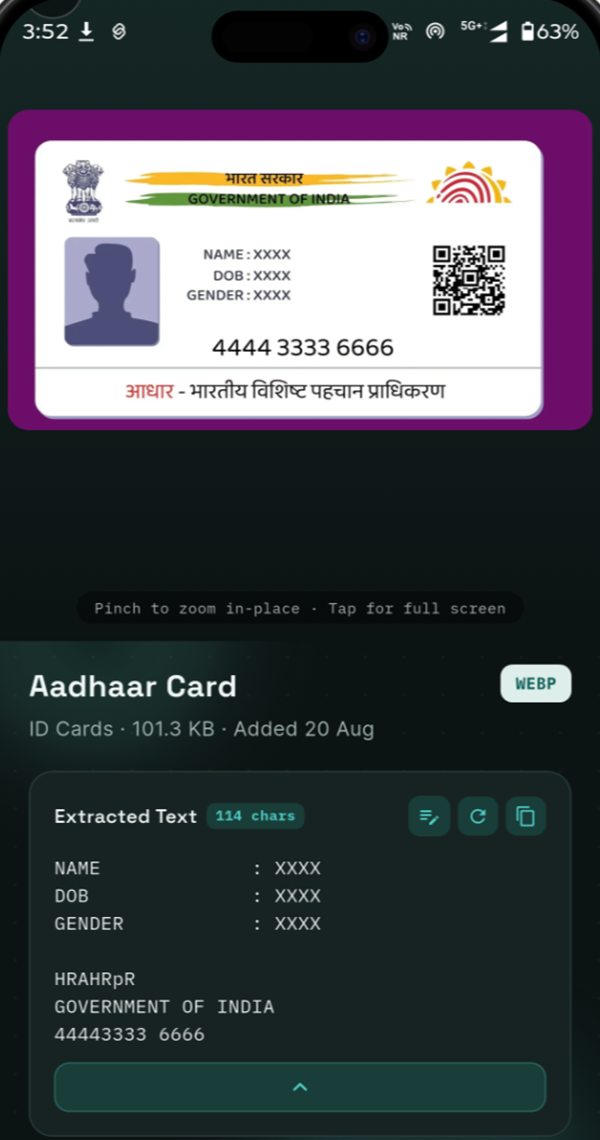
On-device OCR pulls out names, numbers and dates from every scan, ready to copy into a form. The image never leaves your phone to be read.
Offline ML Kit
Copy & edit text
No upload
05 — Find
Search what's written inside.
Search matches document names and the text inside every scan. Filter by PDF or JPG, by category, or sort by newest to narrow it down fast.
Full-text search
Type filters
Sort by date
06 — Share
Send it in the format they ask for.
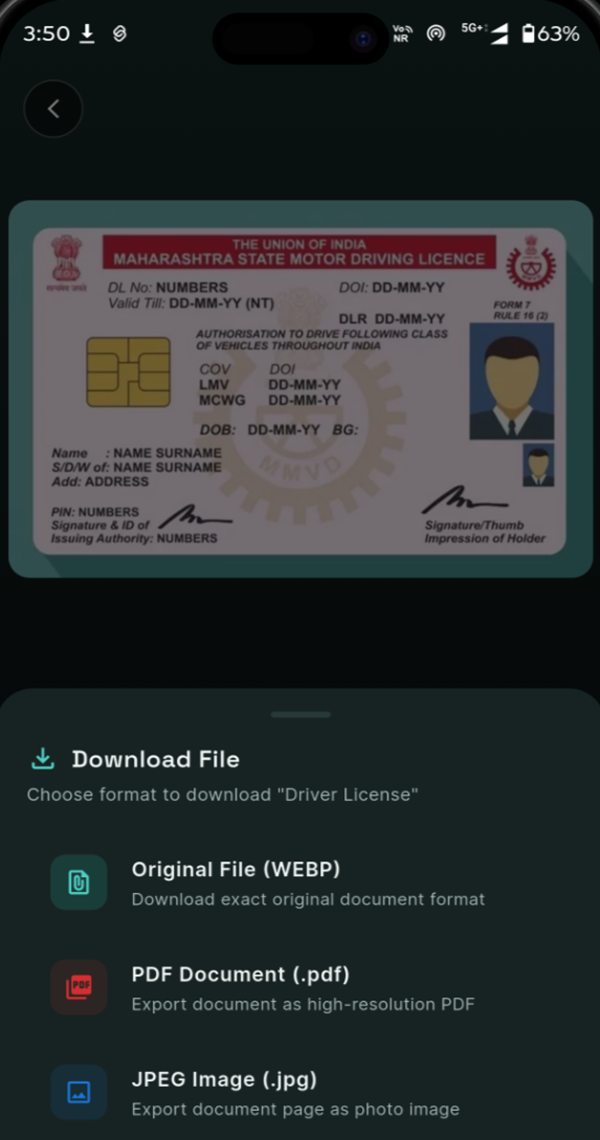
Download or share the original file, a high-resolution PDF or a JPEG, ready for KYC, job portals and admissions. No watermark, ever.
Original · PDF · JPEG
Watermark-free
Share anywhere
01/06
New in Docly 1.2
Your vault, on every phone you use.
Turn on Backup & Sync and Docly keeps a copy in your own Google Drive. Leave it off and nothing leaves your phone.
My Drive
DoclySynced
ID Cards
Documents
Receipts
Others
Google Drive backup & sync
Scan on one phone and open it on another. Your documents live in a Docly folder in your own Drive, sorted the same way as in the app.
Saved on your phone first, then uploaded automatically
Edits, renames and deletions sync both ways
Works offline and catches up when you’re back online
Docly can only see the folder it creates — not the rest of your Drive
60%
Your Document Journey
3 of 5 recommended documents secured
Aadhaar Card
PAN Card
College ID
Passport
Your Document Journey
Tell Docly where you live and what describes you, and it suggests the documents worth keeping. Watch your vault come together, one milestone at a time.
Recommendations for your country and for students, professionals or business owners
Progress counts only what’s relevant — mark anything “Not applicable”
At 100%, ideas for what to add next, like fee receipts or salary slips
Set up in a minute
One question per screen: your region, what describes you, your documents. Skip sign-in and use Docly locally.
Pin & favourite
Keep the documents you use most at the top of your list, and star the ones you want close at hand.
Delete everything, anytime
One button in Settings erases your documents on this phone and in your Google Drive, and disconnects your account.
Why Docly
Your documents don’t go anywhere you don’t send them.
Many free scanner apps upload your pages to their servers to process them, and pay for themselves with ads. Docly does the work on your phone instead.
Typical cloud scanner Leaves your phone
Your phone
every page
Their servers
usage data
Ads & analytics
Docly Stays with you
Your phonescan · OCR · search
only if you turn it on
Your own Google DriveDocly folder only
Biometric lock
Open the vault with your fingerprint, face unlock or device PIN.
No account needed
Install and start scanning. Sign in with Google only if you want Drive sync — there’s no Docly account or profile on a server.
No ads, no trackers
Docly ships without ad networks or analytics SDKs. Nothing is watching.
Backup on your terms
Sync to a Docly folder in your own Google Drive — the only part of your Drive Docly can see. Turn it off anytime.
Free means free
No trial. No premium tier. No catch.
Every feature is included for everyone, including the exports you actually need.
Feature
Docly
Typical free scanner
Price
Free, every feature
Free tier + subscription
Watermark on exports
Never
Common on free plans
Account required
No — sign-in is optional
Usually
Cloud backup
Optional, to your own Google Drive
Their cloud, often on by default
Where OCR runs
On your phone
Often on their servers
Ads
None
Often
Works offline
Scan, read, search, view
Partly
Compared against common patterns in popular free scanner apps. Read our full comparison guide.
Guides
Know where your documents go.
Plain-language guides on scanning, privacy and going paperless.
Yes. Docly is free to download and every feature is free to use: unlimited scanning, multi-page PDFs, on-device OCR, search and the biometric vault. There is no subscription, no premium tier and no export limit.
Are my documents uploaded to any server?
Not to ours. Docly is local-first: your scans, extracted text and document details are saved on your phone. If you turn on Backup & Sync, they are also stored in a Docly folder in your own Google Drive, sent directly from your phone to Google. Docly has no servers of its own that store your files.
How does Google Drive backup and sync work?
Turn on Backup & Sync during setup or in Settings → Cloud & Backup. Each document is saved on your phone first, then uploaded to My Drive › Docly, sorted into ID Cards, Documents, Receipts and Others. Changes sync automatically in both directions, and if you are offline Docly catches up when you are back online. Docly can only see the Docly folder it creates, not the rest of your Drive.
Can I use Docly on more than one phone?
Yes. Sign in with the same Google account on your other phone and turn on Backup & Sync, and your documents appear there automatically. If the same document is changed on two phones, Docly merges the changes or asks which version to keep, so nothing is silently overwritten.
Do I need a Google account to use Docly?
No. Scanning, organising, text recognition, search and the biometric lock all work without signing in. A Google account is only needed if you want to back up and sync your documents with Google Drive.
How do I delete my documents and data?
Delete single documents at any time, or use Settings → Delete Account & All Data. That erases everything Docly stores on your phone and, if Backup & Sync is on, permanently deletes the Docly folder in your Google Drive and revokes Docly’s access to your Google account.
Is Docly a safe offline alternative to DigiLocker for Aadhaar, PAN and driving licence?
Docly is a private place to keep scans of your Aadhaar, PAN, driving licence, RC and other IDs on your own phone, behind your fingerprint, face unlock or PIN, and available even without internet. DigiLocker issues government-verified digital documents, which Docly does not replace for official verification. Docly is for keeping your own copies organised and at hand.
Can I scan both sides of an ID card into one document?
Yes. Multi-page scanning lets you capture the front and back of an Aadhaar card, PAN card, voter ID or driving licence and keep them together as one document or PDF.
Does Docly need internet to open my documents?
No. Scanning, text recognition, search, viewing and organising all work fully offline, without mobile data or Wi-Fi. The one exception: if you free up space with Clear local cache, those documents stay in your Google Drive and download again the next time you open them online.
Does Docly add watermarks to exported PDFs?
Never. Exports are clean and watermark-free, whether you share the original file, a high-resolution PDF or a JPEG — suitable for job applications, admissions and KYC.
How does the OCR text recognition work offline?
Docly uses Google ML Kit text recognition models that run on your phone’s processor. Text, numbers and dates are extracted in moments without sending the image anywhere.
Can I lock the app with my fingerprint?
Yes. Turn on the vault lock and Docly asks for your fingerprint, face unlock or device PIN every time it opens.
Put your paperwork somewhere safe.
Free on Google Play. Scan your first document in under a minute — no account needed. Turn on Google Drive sync whenever you like.